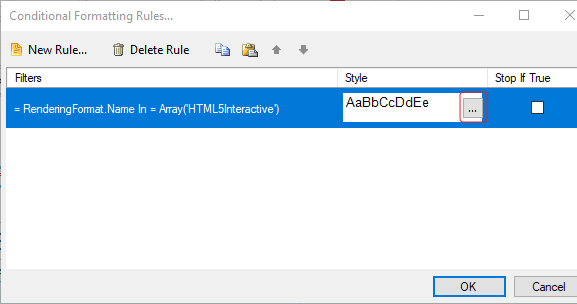
Dalam beberapa kasus, kita ingin menampilkan report dimana (misalkan footer) hanya tampil saat kita print atau hanya saat kita view saja. Berikut langkah untuk hide/show object berdasarkan render report.
- Buatlah report yang diinginkan beserta object yang akan di hide/show.
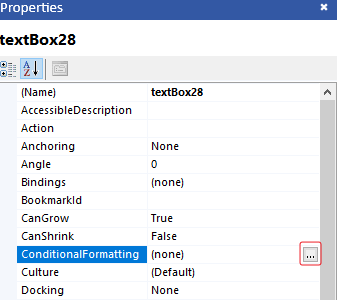
- Click pada object, pilih Conditional Formatting pada properties object.
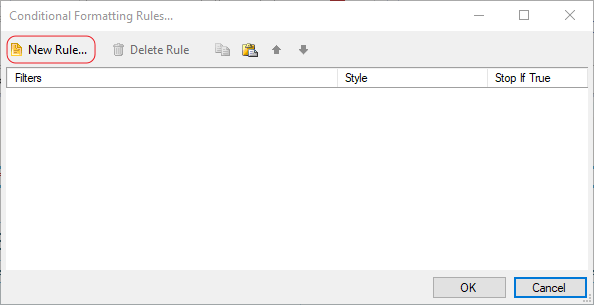
- Click New Rule.
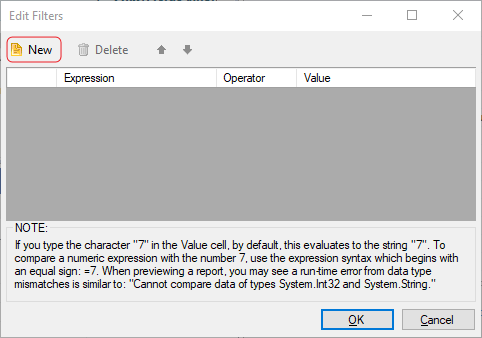
- Click New.
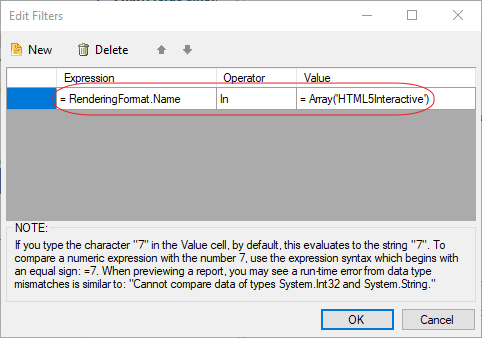
- Isi filter seperti di gambar (Value tergantung pada kebutuhan, untuk contoh berikut hanya HTML5Interactive). Gunakan operator IN untuk multiple/single value dengan value ARRAY atau operator = untuk single value.
- Click OK.
- Pada Style click …
- Uncheck untuk visible (object tidak akan tampil jika render report HTML5Interactive).
- Click OK dan selesai.