Menyisipkan gambar pada kendo text editor, secara default kendo text editor menyediakan fitur untuk menyisipkan gambar pada text editor hanya saja secara default image yang di sisipkan hanya berupa link source gambar, jadi tidak bisa menambahkan gambar dari local system user.
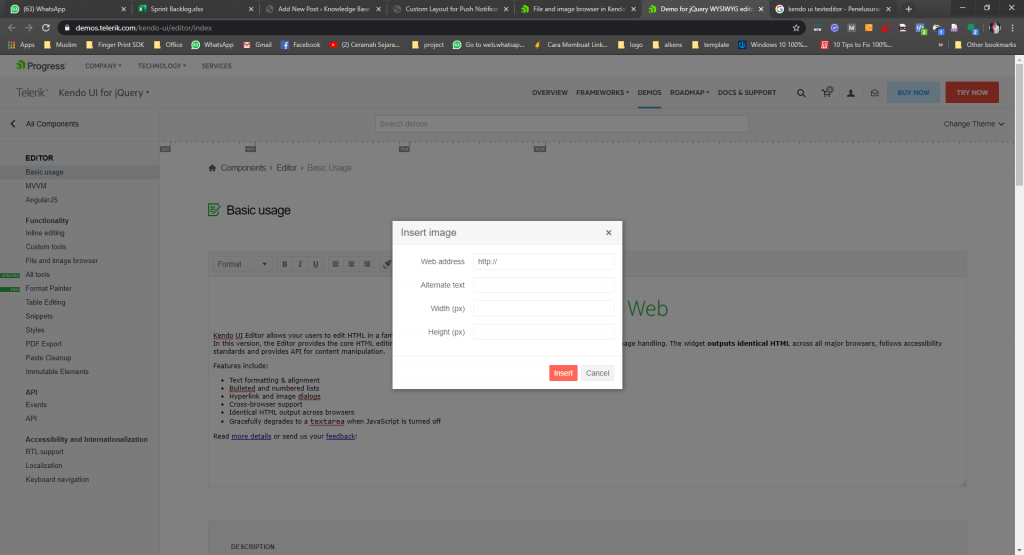
Setelah mencoba browsing mencari referensi, ternyata kendo telah menyediakan fitur untuk mengakomodir fitur tsb, konsepnya dengan cara meng-upload gambar ke server yang akan disisipkan, kemudian setelah gambar ter-upload, user tinggal memilih gambar tersebut untuk di sisipkan pada text editor sekaligus dengan pengaturan ukuran gambar tsb.
Contoh nya dapat dilihat di bawah ini
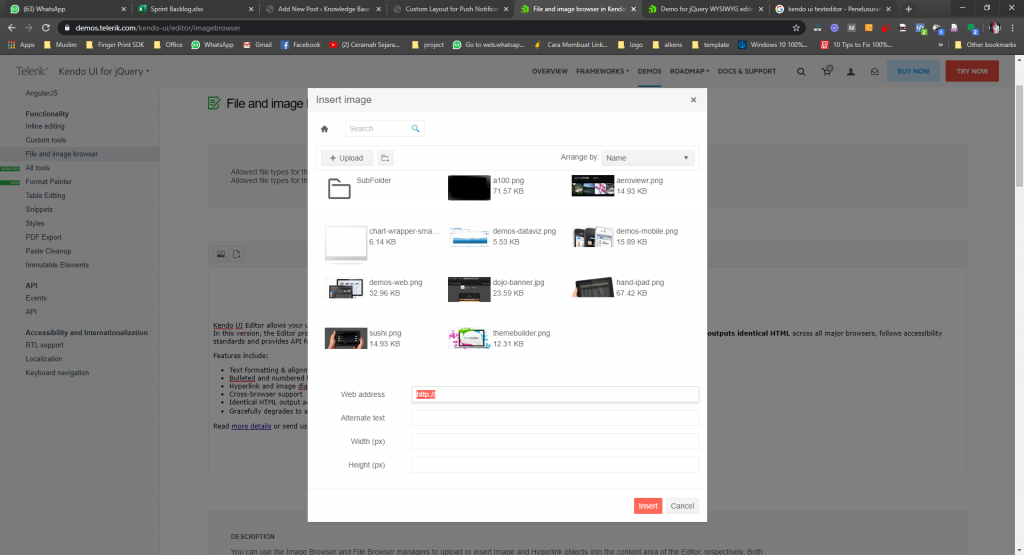
Untuk implementasinya bisa dilihat pada code dibawah ini
Untuk frontend javascriptnya :
$("#editor").kendoEditor({
    tools: ["insertImage"],
    imageBrowser: {
        messages: {
            dropFilesHere: "Drop files here"
        },
        transport: {
            read: "/kendo-ui/service/ImageBrowser/Read",
            destroy: {
                url: "/kendo-ui/service/ImageBrowser/Destroy",
                type: "POST"
            },
            create: {
                url: "/kendo-ui/service/ImageBrowser/Create",
                type: "POST"
            },
            thumbnailUrl: "/kendo-ui/service/ImageBrowser/Thumbnail",
            uploadUrl: "/kendo-ui/service/ImageBrowser/Upload",
            imageUrl: "/kendo-ui/service/ImageBrowser/Image?path={0}"
        }
    },
});
kemudian untuk backendnya, siapkan satu controller ImageBrowser
dan beberapa class Model
Code controller ImageBrowserController.cs
private string contentFolderRoot = "~/Content";
private const string prettyName = "Images/";
private static readonly string[] foldersToCopy = new[] { "~/Content/editor/" };
private const string DefaultFilter = "*.png,*.gif,*.jpg,*.jpeg";
private const int ThumbnailHeight = 80;
private const int ThumbnailWidth = 80;
private readonly DirectoryBrowser directoryBrowser;
private readonly ContentInitializer contentInitializer;
private readonly ThumbnailCreator thumbnailCreator;
public ImageBrowserController()
{
    directoryBrowser = new DirectoryBrowser();
    contentInitializer = new ContentInitializer(contentFolderRoot, foldersToCopy, prettyName);
    thumbnailCreator = new ThumbnailCreator();
}

public string ContentPath
{
    get
    {
        return contentInitializer.CreateUserFolder(Server);
    }
}

private string ToAbsolute(string virtualPath)
{
    return VirtualPathUtility.ToAbsolute(virtualPath);
}

private string CombinePaths(string basePath, string relativePath)
{
    return VirtualPathUtility.Combine(VirtualPathUtility.AppendTrailingSlash(basePath), relativePath);
}

protected virtual bool CanAccess(string path)
{
    return path.StartsWith(ToAbsolute(ContentPath), StringComparison.OrdinalIgnoreCase);
}

private string NormalizePath(string path)
{
    if (string.IsNullOrEmpty(path))
    {
        return ToAbsolute(ContentPath);
    }
    string contentPath = ContentPath;
    return CombinePaths(ToAbsolute(ContentPath), path);
}

public virtual JsonResult Read(string path)
{
    path = NormalizePath(path);
    try
    {
        directoryBrowser.Server = Server;
        var result = directoryBrowser
            .GetContent(path, DefaultFilter)
            .Select(f => new
            {
                name = f.Name,
                type = f.Type == EntryType.File ? "f" : "d",
                size = f.Size
            });
        return Json(result, JsonRequestBehavior.AllowGet);
    }
    catch (DirectoryNotFoundException)
    {
        throw new HttpException(404, "File Not Found");
    }
    throw new HttpException(403, "Forbidden");
}


[OutputCache(Duration = 3600, VaryByParam = "path")]
public virtual ActionResult Thumbnail(string path)
{
    path = NormalizePath(path);
    var physicalPath = Server.MapPath(path);
    if (System.IO.File.Exists(physicalPath))
    {
        Response.AddFileDependency(physicalPath);
        return CreateThumbnail(physicalPath);
    }
    else
    {
        throw new HttpException(404, "File Not Found");
    }
}

private FileContentResult CreateThumbnail(string physicalPath)
{
    using (var fileStream = System.IO.File.OpenRead(physicalPath))
    {
        var desiredSize = new ImageSize
        {
            Width = ThumbnailWidth,
            Height = ThumbnailHeight
        };
        const string contentType = "image/png";
        return File(thumbnailCreator.Create(fileStream, desiredSize, contentType), contentType);
    }
}

[AcceptVerbs(HttpVerbs.Post)]
public virtual ActionResult Destroy(string path, string name, string type)
{
    path = NormalizePath(path);
    if (!string.IsNullOrEmpty(name) && !string.IsNullOrEmpty(type))
    {
        path = CombinePaths(path, name);
        if (type.ToLowerInvariant() == "f")
        {
            DeleteFile(path);
        }
        else
        {
            DeleteDirectory(path);
        }
        return Json(new object[0]);
    }
    throw new HttpException(404, "File Not Found");
}

public virtual bool AuthorizeDeleteFile(string path)
{
    return CanAccess(path);
}

public virtual bool AuthorizeDeleteDirectory(string path)
{
    return CanAccess(path);
}

protected virtual void DeleteFile(string path)
{
    if (!AuthorizeDeleteFile(path))
    {
        throw new HttpException(403, "Forbidden");
    }

    var physicalPath = Server.MapPath(path);
    if (System.IO.File.Exists(physicalPath))
    {
        System.IO.File.Delete(physicalPath);
    }
}

protected virtual void DeleteDirectory(string path)
{
    if (!AuthorizeDeleteDirectory(path))
    {
        throw new HttpException(403, "Forbidden");
    }

    var physicalPath = Server.MapPath(path);
    if (Directory.Exists(physicalPath))
    {
        Directory.Delete(physicalPath, true);
    }
}

[AcceptVerbs(HttpVerbs.Post)]
public virtual ActionResult Create(string path, FileBrowserEntry entry)
{
    path = NormalizePath(path);
    var name = entry.Name;

    if (!string.IsNullOrEmpty(name))
    {
        var physicalPath = Path.Combine(Server.MapPath(path), name);
        if (!Directory.Exists(physicalPath))
        {
            Directory.CreateDirectory(physicalPath);
        }
        return Json(new
        {
            name = entry.Name,
            type = "d",
            size = entry.Size
        });
    }
    throw new HttpException(403, "Forbidden");
}


public virtual bool AuthorizeUpload(string path, HttpPostedFileBase file)
{
    return IsValidFile(file.FileName);
}

private bool IsValidFile(string fileName)
{
    var extension = Path.GetExtension(fileName);
    var allowedExtensions = DefaultFilter.Split(',');
    return allowedExtensions.Any(e => e.EndsWith(extension, StringComparison.InvariantCultureIgnoreCase));
}

[AcceptVerbs(HttpVerbs.Post)]
public virtual ActionResult Upload(string path, HttpPostedFileBase file)
{
    path = NormalizePath(path);
    var fileName = Path.GetFileName(file.FileName);
    if (AuthorizeUpload(path, file))
    {
        file.SaveAs(Path.Combine(Server.MapPath(path), fileName));
        return Json(new
        {
            size = file.ContentLength,
            name = fileName,
            type = "f"
        }, "text/plain");
    }
    throw new HttpException(403, "Forbidden");
}

[OutputCache(Duration = 360, VaryByParam = "path")]
public ActionResult Image(string path)
{
    path = NormalizePath(path);
    if (AuthorizeImage(path))
    {
        var physicalPath = Server.MapPath(path);
        if (System.IO.File.Exists(physicalPath))
        {
            const string contentType = "image/png";
            return File(System.IO.File.OpenRead(physicalPath), contentType);
        }
    }
    throw new HttpException(403, "Forbidden");
}

public virtual bool AuthorizeImage(string path)
{
    return IsValidFile(Path.GetExtension(path));
}
Untuk referensi bisa dilihat di
https://demos.telerik.com/kendo-ui/editor/imagebrowser
dan
sample service
