Fitur javascript disimpan pada file WebUI/Scripts/webapp.js. Fitur javascript yang otomatis aktif antara lain:
1. Menampilkan tanda asterisk (*) pada label field yang required di form create/edit
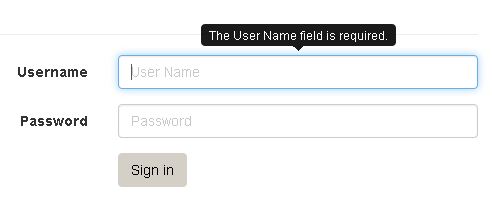
2. Menampilkan pesan tooltip pada form field ketika dihover untuk membantu user mengisi
3. Datepicker
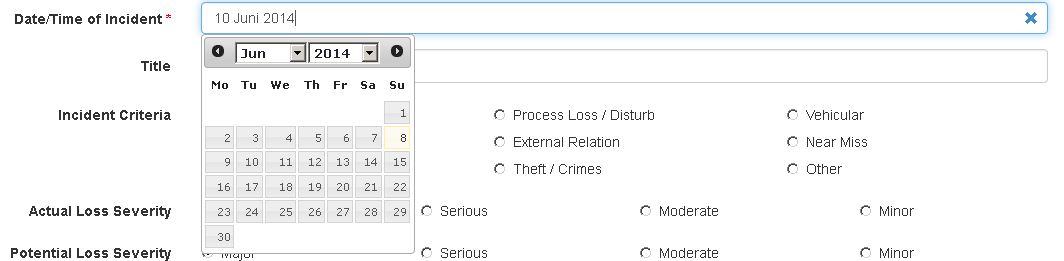
Input datepicker tinggal diberikan css class .form-control-datetimepicker. Berhubung input datepicker di-set readonly, untuk menghapus bisa menggunakan fungsi javascript clearValue, dengan parameter selector input datepicker.
[code language=”csharp”]
<div class="form-group">
@Html.LabelFor(model => model.DateIncident, new { @class = "col-xs-3 control-label" })
<div class="col-xs-9 has-feedback">
@Html.EditorFor(model => model.DateIncident, new { htmlAttributes = new { @class = "form-control form-control-datetimepicker" } })
@Html.ValidationMessageFor(model => model.DateIncident)
<span class="form-control-feedback"><a href="javascript:" onclick="clearValue(‘#DateIncident’)"><span class="glyphicon glyphicon-remove"></span></a></span>
</div>
</div>
[/code]
4. Konfirmasi ketika user mau menutup window tapi form sudah diubah tapi belum di-save

5. FCKEditor
Kode di model
[code language=”csharp”]
[DataType(DataType.MultilineText)]
[AllowHtml]
public string Description { get; set; }
[/code]
Kode di view
[code language=”csharp”]
@Scripts.Render("~/Scripts/wcw/ckeditor");
//…
@Html.EditorFor(model => model.Description, new { htmlAttributes = new { @class = "form-control ckeditor" } })
[/code]
6. Kendo Web Grid
Fungsi terkait kendo web grid di webapp.js
[code language=”javascript”]
function getDataRowGrid(e) //mengambil data dari row
function displayEmptyGrid(el, message) //menampilkan pesan jika data grid kosong
[/code]
Contoh penggunaan kendo web grid di view
[code language=”javascript”]
//create url ke detail
function CreateUrl(id, name) {
var a = $("<a>"+name+"</a>");
var href = ‘@Url.Action("Detail", "Project")’ + ‘/’ + id;
a.attr(‘href’, href);
return a.outerHTML();
}
//dropdownlist filter status
function typeFilter(element) {
element.kendoDropDownList({
dataTextField: "Title",
dataValueField: "Id",
dataSource: {
data: statusOptions
},
optionLabel: "–Select Value–",
});
}
//menghapus item
function deleteItem(e) {
e.preventDefault();
var data = this.dataItem(getDataRowGrid(e));
goToDeletePage(‘@Url.Action("Delete", "Project")’ + "?id=" + data.Id);
}
$(document).ready(function () {
$("#grid").kendoGrid({
dataSource: {
transport: {
read: {
url: "@Url.Action("Binding", "Project")",
dataType: "json",
},
},
schema: {
data: "data",
total: "total",
},
pageSize: 10,
serverPaging: true,
serverFiltering: true,
serverSorting: true,
//filter: { field: "Status", operator: "contains", value: "RETRIEVED" }
sort: { field: "Id", dir: "desc" },
},
filterable: true,
pageable: true,
sortable: true,
columns: [
{
field: "Id",
type: "number",
width: 60,
},
{
field: "Name",
template: "#= CreateUrl(Id, Name) # ",
title: "Nama Proyek",
},
{
field: "ContractorName",
title: "Kontraktor",
},
{
field: "ProjectStage",
title: "Project Stage",
width: 150,
},
{
field: "LastWeeklyReport",
sortable: false,
filterable: false,
title: "Laporan Mingguan Terakhir",
width: 200,
},
{
field: "Status",
type: "string",
encoded: false,
width: 80,
filterable: {
ui: typeFilter,
operators: {
number: {
eq: "Is equal to",
}
},
extra: false,
}
},
{
command: [
{
name: "delete",
text: "delete",
click: deleteItem,
imageClass: "glyphicon glyphicon-remove",
template: ‘<a class="k-button-icon #=className#" #=attr# href="\\#"><span class="#=iconClass# #=imageClass#"></span></a>’
}
],
width: "50px"
}
],
});
});
[/code]
7. Datepicker untuk filter kendo grid
[code language=”javascript”]
columns: [
{
field: "StartDate",
title: "Tanggal",
template: "#= createUrlWeeklyReport(Id, Interval) # ",
filterable: {
ui: typeFilterDatepicker,
operators: {
string: {
eq: "Is equal to",
}
},
extra: false,
}
},
]
[/code]
8. Konfirmasi ketika user menekan tombol delete
Berikan class delete-button ke tombol delete.
[code language=”html”]
<a href="#" class="delete-button"><span class="glyphicon glyphicon-remove"></span></a>
[/code]
